
How to start and use the HowTo SMTP server in Tabulify ?
About
We provide a smtp:
- and howto service (ie a Mailpit smtp server, a local server that accepts all messages)
This howto shows you how to:
- start an SMTP server with the smtp howto docker service
- and use the smtp howto connection.
Steps
Docker Installation
howto docker services are an easy way to start locally a database instance.
Because howto services are docker services, you should have docker installed on your computer.
Check the service
By default, the user configuration vault is created with the howto docker services.
You can check if the smtp service is present and see its attributes with:
- the tabul service info command
- or the configuration vault
tabul service info smtp
Information about the service (smtp)
Attribute     Value                                                      Description
-----------   --------------------------------------------------------   --------------------------
COMMAND                                                                  The command
ENVIRONMENT   {MP_LABEL=Tabulify HowTo Service, MP_TENANT_ID=tabulify}   The environment attributes
IMAGE         axllent/mailpit:v1.25.1                                    The image
IS_STARTED    false                                                      The status of the service
NAME          smtp                                                       The name of the service
ORIGIN        CONF                                                       The origin of the system
PORTS         1025:1025, 8025:8025                                       The ports
TYPE          docker                                                     The type of the system
VOLUMES                                                                  The volumes
tabul data print --type text .tabul/.tabul.yml@home | yq '.spec.services.smtp'
environment:
  MP_LABEL: Tabulify HowTo Service
  MP_TENANT_ID: tabulify
image: axllent/mailpit:v1.25.1
ports:
  - 1025:1025
  - 8025:8025
type: docker
If the service is not present move or delete your user configuration vault file.
Start the smtp service
To start the docker service, you can use
- the tabul service start command
- or the docker command
This service is based on the Mailpit Docker image.
tabul service start smtp
1 service was started
Name   Type
----   ------
smtp   docker
You can use start the local database with the following Bash command :
docker run \
    -e "MP_LABEL=Tabulify HowTo Service" \
    -e MP_TENANT_ID=tabulify \
    -p 1025:1025 \
    -p 8025:8025 \
    -d \
    --name smtp \
    axllent/mailpit:v1.25.1
docker run ^
    -e "MP_LABEL=Tabulify HowTo Service" ^
    -e MP_TENANT_ID=tabulify ^
    -p 1025:1025 ^
    -p 8025:8025 ^
    -d ^
    --name smtp ^
    axllent/mailpit:v1.25.1
Check that you can ping/connect to the service with the connection
tabul connection ping smtp
The connection (smtp) has been pinged successfully
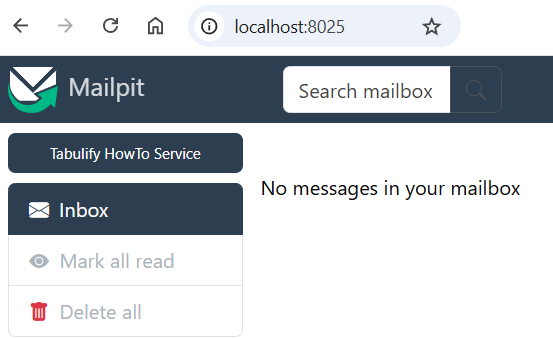
Check that you can access the local inbox
The local mailpit inbox is available at: http://localhost:8025
Connection Info
By default, the user configuration vault is created with the howto docker services.
You can check the service with the tabul service info command
tabul connection info smtp
Information about the connection (smtp)
Attribute                    Value                   Description
--------------------------   ---------------------   --------------------------------------------------------------------
AUTH                         false                   Smtp server authentication required?
BCC                                                  The default blind carbon copy addresses
BOOLEAN_DATA_TYPE            Native                  Boolean data type used to store boolean values
CC                                                   The default carbon copy addresses if none is provided
CHAR_DEFAULT_PRECISION       1                       Default CHAR precision
COMMENT                      HowTo Smtp Connection   A connection description
DATE_DATA_TYPE               NATIVE                  Date data type used to store date values
DEBUG                        false                   Smtp Debug
FROM                         [email protected]    The default from address if none is provided
HOST                         localhost               Host Server
MAX_CONCURRENT_THREAD                                The maximum number of threads that can be created against the system
MAX_NAME_IN_PATH                                     The maximum number of names in a path
NAME                         smtp                    The name of the connection
NATIVES                                              Native Driver attributes (jdbc properties, ...)
NCHAR_DEFAULT_PRECISION      1                       Default NCHAR precision
NVARCHAR_DEFAULT_PRECISION   0                       Default NVARCHAR precision
ORIGIN                       CONF                    The origin of the connection
PASSWORD                                             The user password
PORT                         1025                    Host Port
TIMESTAMP_DATA_TYPE          NATIVE                  Timestamp data type used to store timestamp values
TIME_DATA_TYPE               NATIVE                  Time format data type to store time values
TLS                          false                   Smtp TLS communication required
TO                           [email protected]    The default `to` addresses if none is provided
URI                          smtp://localhost:1025   The uri of the connection
USER                                                 The user name
VARCHAR_DEFAULT_PRECISION    0                       Default VARCHAR precision
WORKING_PATH                                         The working path (Schema for database, directory for file system)
You can also check the connection attributes with the configuration vault
tabul data print --type text .tabul/.tabul.yml@home | yq '.spec.connections.smtp'
comment: HowTo Smtp Connection
from: [email protected]
to: [email protected]
uri: smtp://localhost:1025
If the connection is not present, move or delete your user configuration vault file
Use the smtp connection
You can then use the smtp connection with the sendmail operation via the target URI
Example:
pipeline:
  - ...
  - name: "Send"
    operation: "sendmail"
    args:
      target-uri: "@smtp" # smtp is the default smtp connection and is therefore optional
Note that it's optional as smtp is the default connection name.
Full Howto Examples:
Stop the smtp service
Once, you don't need the smtp service, you can stop it:
- with the tabul service stop command
- or with Docker
tabul service stop smtp
1 service was stopped
Name   Type
----   ------
smtp   docker
You can also stop it with Docker
docker stop smtp