About
This howto shows you how to send an email with a data resource attached via the sendmail operation.
Steps
In the below pipeline, we use the following steps:
Start the howto smtp server
Start the howto smtp server
tabul service start smtp
1 service was started
Name   Type
----   ------
smtp   docker
Check that you can ping it
tabul connection ping smtp
The connection (smtp) has been pinged successfully
The pipeline
kind: pipeline
spec:
  steps:
    - name: "Select"
      comment: "This operation select the resources to send"
      operation: "select"
      args:
        data-selector: "email/*.csv@howto"
    - name: "Send"
      comment: "Send the selected resources as email attachment"
      operation: "sendmail"
      args:
        target-uri: "@smtp" # smtp is the default smtp connection and is therefore optional
        to: "[email protected]"
        subject: "Demo: How to send resources"
        txt: |
          Please, find attached the report data
The execution
You can execute this pipeline with the execute command
tabul flow execute pipeline/email_resources.yml@howto
Output:
Execution Metrics of the pipeline (email_resources)
metrics                  value
----------------------   ----------------------------------------------------------
pipeline-path            /opt/tabulify/resources/howto/pipeline/email_resources.yml
processing-type          batch
start-time               2025-11-10T20:01:57.699313769Z
end-time                 2025-11-10T20:01:57.821443266Z
total-elapsed-time       0.122s
execution-elapsed-time   0.122s


Step execution results for the pipeline (email_resources)
step_id   step_name   operation_name   operation_type   processing_type   input_counter   output_counter   execution_counter   error_counter   parking_counter
-------   ---------   --------------   --------------   ---------------   -------------   --------------   -----------------   -------------   ---------------
      1   Select      select           Supplier         batch                         0                1                   0               0                 0
      2   Send        sendmail         Map              stream                        1                1                   1               0                 0
Check the Inbox
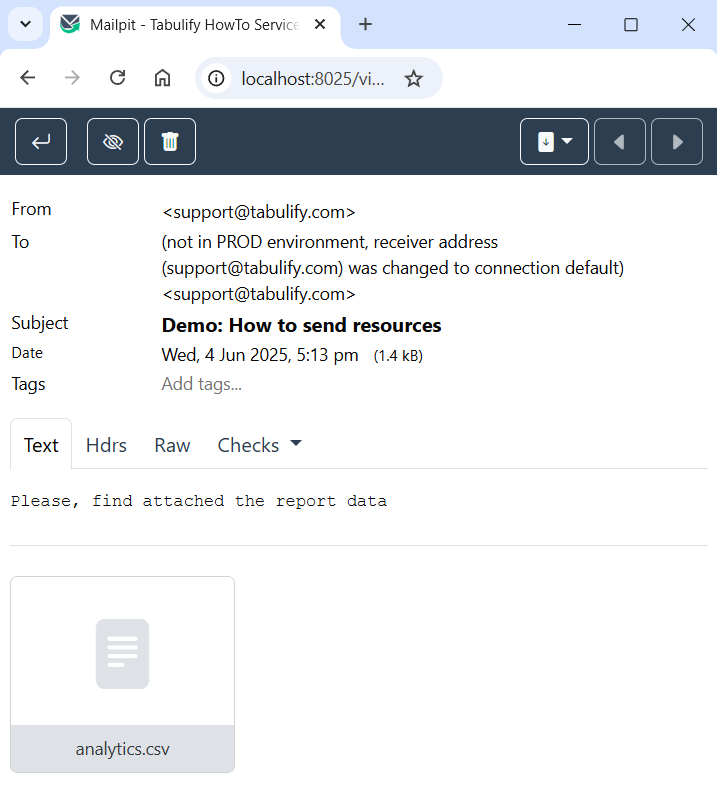
In the mailpit inbox, you can then see the email with the attached csv.