
How to write a Javascript expression generator?
About
This howto will show you how to write an expression for a expression generator.
An expression generator generates data from another column based on an expression.
Example
This example generate a times table (known also a time dimension in analytics).
It's using a:
- and expressions to generate the next columns:
- month
- year
kind: generator
spec:
  MaxRecordCount: 10
  Columns:
    # Generate 10 days sequentially
    - name: d_date
      comment: A date
      Type: date
      data-supplier:
        type: sequence
        arguments:
          start: 2025-06-06 # by default, today
    # Generate the month of the year from the date with an expression
    - name: d_moy
      comment: the month number in year
      Type: Integer
      data-supplier:
        type: expression
        arguments:
          column-variable: d_date
          expression: "d_date.getMonth()+1"
    # Generate the year from the date with an expression
    - name: d_year
      comment: The year number
      Type: Varchar
      Precision: 4
      data-supplier:
        type: expression
        arguments:
          column-variable: d_date
          expression: "d_date.getFullYear()"
You would get the following data:
tabul data print generator/expression--generator.yml@howto
d_date       d_moy   d_year
----------   -----   ------
2025-06-05       6   2025
2025-06-04       6   2025
2025-06-03       6   2025
2025-06-02       6   2025
2025-06-01       6   2025
2025-05-31       5   2025
2025-05-30       5   2025
2025-05-29       5   2025
2025-05-28       5   2025
2025-05-27       5   2025
What are Expressions ?
Expressions are Javascript expressions.
Tabulify pass the data as native javascript data type in a variable with the name of the column. You don't need to instantiate the variables, Tabulify do.
Note:
- For date/timestamp/time data type, we create a Date as this is the only temporal data type of javascript.
- For all numbers (Double, Integer, …) , we create a Number as this is also the only number data type of javascript.
Example for 2009/10/01 and the column name date, Tabulify would create the date variable like this:
date = new Date("2009","10","01")
And if you want the month, you expression would use getMonth :
date.getMonth()+1
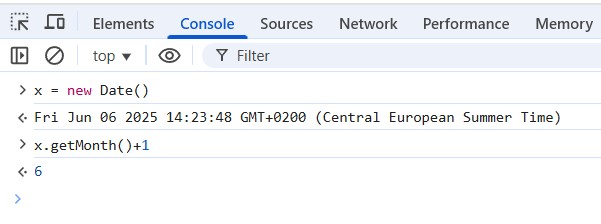
Develop your expression in the Devtool or Node Console
You can test your expression quickly with:
- your browser_devtool_console (F12 > Console)
- or the node_console
Browser Devtool Console
Illustration of Devtool and a time expression to get the month
Node Console
Illustration of Node in the terminal and a time expression to get the month

Snippet of expressions
This section is showing snippet of expression (Javascript).
Time
- Month where x represents the column name value of the parent columns
x.getMonth()+1 // Month
- Month names. The below snippet use a date column as parent and lookup an array to get the month name.
var monthNames = ['Jan', 'Feb', 'Maa', 'Apr', 'Mei', 'Jun', 'Jul', 'Aug', 'Sep', 'Okt', 'Nov', 'Dec'];
monthNames[x.getMonth()]
- Year number
x.getFullYear()
Email String concatenation where:
- x would be a name from the first parent column
- y would be a company name from the second parent column
- z would be a TLD domain extension (.com, …)
x+'@'+y+'.'+z